
For Claude Code and Claude Desktop · macOS

The local command center for everything Claude produces, project by project.

One project, one folder on your Mac. Hipokamp keeps the memory Claude reads, its sessions, your notes, your databases and your posts there. And every file stays a plain .md.

Full trial, no credit card. No subscription, no account, no cloud.

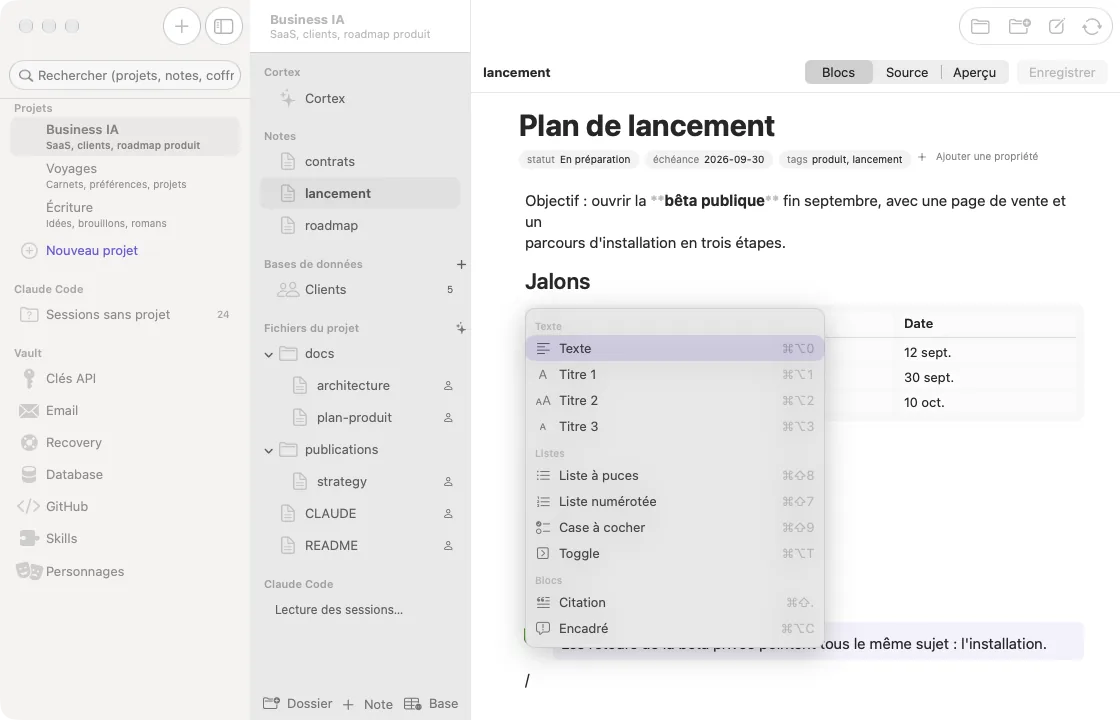
Hipokamp block editor with the slash menu open on a project note
The block editor: slash menu, drag and drop, page properties. Underneath, an ordinary Markdown file.

What Claude produces, filed project by project

Claude produces a lot: code, plans, articles, decisions. Hipokamp puts each of them in the right place and hands them back to Claude when it needs them.

Claude Code and Claude Desktop, together per project

Each project has its Cortex: a condensed memory of about 5,000 tokens that Claude reads before the raw notes. It only loads the current project, so you don't pay tokens for the rest.

  • Claude Code sessions attached to the project by their working folder.
  • Claude Desktop conversations summarized into the project.
  • MCP server and Node runtime built in: nothing else to install.

A block editor on files that stay yours

The comfort of Notion, on Markdown. A file you haven't touched is written back byte for byte: that is a blocking test in the project, not a promise.

  • Slash menu, drag and drop, page properties.
  • Databases as table, Kanban or calendar, one row = one .md file.
  • Your folders open in any other editor too.

Posts and an editorial calendar

One calendar per project, with the editorial strategy Claude reads before writing. Claude drafts the post, you approve it, your tool publishes it.

  • Eleven networks, with length limits checked before scheduling.
  • Calendar, Kanban and table views.
  • Hand-off to your publishing tool (n8n or any webhook).

And in the same place: each project's characters, design system, GitHub repositories and skills.

Nothing goes through a BAAIR server

We don't run one, and you don't create an account. Hipokamp works on your folders and your macOS Keychain.

  • 100% localOn its own, the app only goes online to activate your license and check for updates. Services you connect (GitHub, Notion, your webhook) are called directly, with your keys.
  • Secrets in the KeychainAPI keys and passwords live in the macOS Keychain, never in a plain-text .env file.
  • No secret shown to ClaudeClaude only sees key names. Only the get_api_key tool reads a value, when you ask for it.
  • Signed and notarizedSigned with BAAIR's Developer ID and notarized by Apple: macOS opens it without a warning.
  • No data loss, everAfter the trial or without a license, the app becomes read-only. Your files stay .md files you can open anywhere.

Pay once

A perpetual license instead of a subscription: the app runs on your Mac and has no server to pay for.

Launch price

€39 incl. VAT, one time

Regular price afterwards: €49.

  • Perpetual license, no subscription.
  • One year of updates included.
  • Two Macs per license, releasable from the app.
  • Payment and invoice by Lemon Squeezy.

14-day trial

  • Every feature unlocked.
  • No credit card, no account.
  • When it ends, read-only: nothing is deleted.

Download

Drag the app into Applications and open it: the assistant finds your Claude Code projects and connects Claude.

Hipokamp for Mac

The app, with the MCP server and the Claude Desktop extension already inside. .dmg file.

Download the .dmg

Claude Desktop extension only

The hipokamp.mcpb file, to reinstall the extension without the assistant. Requires the app.

Download the .mcpb

macOS 14 Sonoma or later · Apple Silicon Mac (on Intel, Node must be installed) · Claude Desktop and/or Claude Code · App interface in French for now.

Frequently asked questions

How does it work with Claude Code?

The assistant adds Hipokamp to Claude Code with one command (claude mcp add hipokamp), for all your folders. At the start of a session, Claude activates the relevant project and reads its Cortex; your sessions show up in the project, readable and exportable as notes.

And with Claude Desktop?

The assistant installs the hipokamp.mcpb extension; you then enable it in Claude Desktop's settings. Claude can list your projects, read the memory, save a document or summarize the conversation into the project.

Does it work with ChatGPT?

For advanced users, yes. The MCP server can also speak HTTP, but ChatGPT requires a public HTTPS address, so you need a tunnel to your Mac. Hipokamp is built for Claude first, and that's where everything is tested.

I use ClaudeVault v1. Do I need to migrate?

Nothing to do. Hipokamp reads the same ~/.vault-mcp folder and the same Keychain: your profiles become projects and memory.md becomes cortex.md on first launch. The v1 file keeps being written as a mirror, and ClaudeVault v1 stays free and open source.

How do updates work?

The app checks for them and offers to install them. One year of updates is included; after that, your version keeps working, and you can extend updates for €29 a year if you want.

Can I get a refund?

Yes: email alexandre@baair.solutions within 14 days of purchase, no questions asked. Lemon Squeezy refunds the payment method you used. The free 14-day trial is still the best way to decide before paying.

Does my data go anywhere?

No. Projects are folders on your disk, secrets are in the macOS Keychain. The app only goes online to activate the license and check for updates, plus the services you choose to connect.

What does Claude see of my API keys?

Names, never values. A value is only read if you explicitly ask for get_api_key.

What if I stop paying?

Nothing is lost: without a license the app becomes read-only, and your .md files still open in any editor.

Do I need to install Node?

No, it's inside the app. It is built for Apple Silicon; on an Intel Mac, the app uses the system's Node if there is one.

Is this an Anthropic product?

No. Hipokamp is an independent product by BAAIR that talks to Claude over the MCP protocol.